
ManyRequests is a white-label client portal and agency management platform, founded in 2019 by Robin Vander Heyden (CEO) and Gabriel Lecointere (CTO), that lets agencies sell services, take client requests, deliver and proof work, track time, and bill clients in one branded place. The company is backed by Calm Company Fund, and more than 1,800 agencies use it.
The client portal and agency management platform has grown and shipped a lot in the past year. 82 product updates between November 2025 and October 2026, including a public API, an MCP server that lets you run your portal from Claude or ChatGPT, self-serve plan upgrades, setup fees, and an installable branded app.
I’ve seen different agency owners recommend ManyRequests over the years, and I got curious because of how fast the product is growing. I dug deep to find out why agencies are signing up and using ManyRequests. Below, I break down every ManyRequests feature, the real cost for teams of different sizes, the limits nobody mentions, what users say, who should use ManyRequests, and what the onboarding and total experience look like.
ManyRequests review: key takeaways
- Verdict: I recommend ManyRequests for productized and subscription agencies that want selling, requests, delivery, time tracking, and billing in one branded portal. It's not built for complex, custom project management.
- Its best feature is scope control: you cap how many active requests each client can have per service, and extra requests wait in a queue the client can reorder. That turns the typical 'one more small thing' into a paid upgrade.
- Pricing: Core costs $39 a month with 2 seats and Pro $99 a month with 5 seats ($27 and $69 billed annually), with extra seats at $8 to $14 each. A five-person team on Pro pays $69 to $99 a month, and Scale, with unlimited seats, costs $559 to $799. You get unlimited clients and no fees on payments across all plans..
- Billing runs only through Stripe. If Stripe isn't fully available in your country, you'll fall back to manual payments and lose automatic subscriptions.
- Public reviews are few: 4.5/5 from 1 review on G2 and 5/5 from 7 on Capterra. I recommend you use the 14-day free trial (no card) to test it with a real client then decide.
How I tested ManyRequests
To test and learn more about ManyRequests, I used the free trial to sign up for an account. It took me about 3 minutes to get my account up and running. I tested the different features and noted how smooth the experience was.
Beyond my hands-on testing, I went through ManyRequests' pricing page, all nine sections of its help center, its full public changelog, its security, GDPR, and comparison pages, its founders' page, reviews on G2 and Capterra, some independent hands-on reviews, and the pricing pages of its closest competitors.
What is ManyRequests?
ManyRequests is an all-in-one client portal for agencies and productized service businesses: clients buy your services, submit requests, review deliverables, and pay, all inside a portal with your brand on it, while your team manages the work, time, and invoices behind it.
Fact | Detail |
|---|---|
Company | ManyRequests LLC |
Founded | 2019, by Robin Vander Heyden (Co-Founder and CEO) and Gabriel Lecointere (Co-Founder and CTO) |
Funding | Backed by Calm Company Fund |
Customers | 1,800+ agencies. Some named customers include DesignGuru, EditCrew, VideoTaxi, and Mooncut |
Built for | Design, video, content, SEO, marketing, Webflow, 3D agencies, and productized services in general. |
Plans | Core, Pro, and Scale, plus custom Enterprise contracts. |
Free trial | 14 days, no card required |
Payments | Stripe (cards, wallets, and ACH for US clients), plus manual payments |
Support | Live chat and email, Monday to Friday, 9 a.m. to 6 p.m. EST |
My first impression is that ManyRequests replaces the stack many small agencies glue together (a website checkout, Trello or ClickUp, Google Drive, a time tracker, and Stripe invoices) with one portal your clients log into.
What Onboarding on ManyRequests Looks Like
Getting started with ManyRequests is pretty straightforward. Once you sign up and fill in your details, the platform automatically sets up a client portal branded with your agency's name.
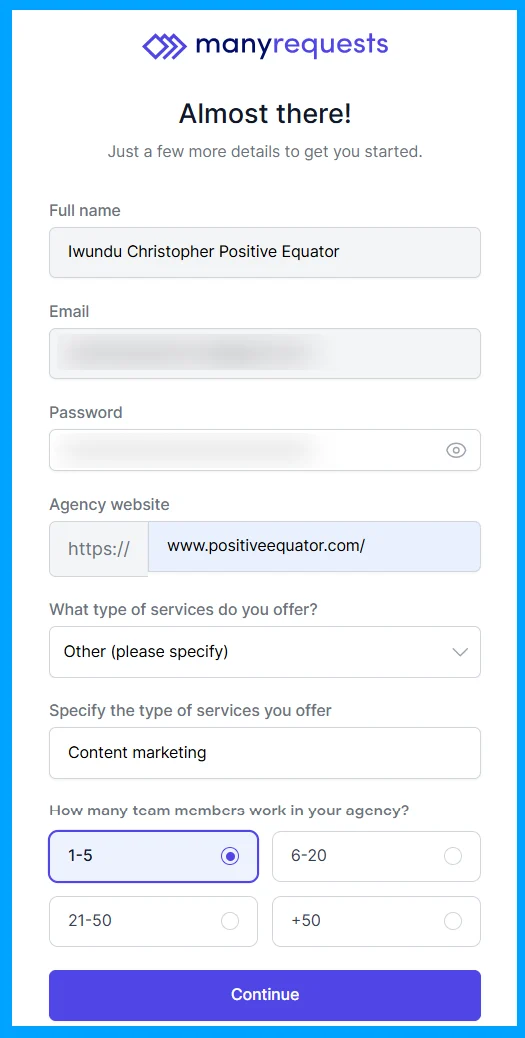
From there, you get to customize your portal by adding your logo, choosing your brand colors, and adjusting the portal name and other branding details. You can also invite your teammates and assign them roles as either team members or admins.
Next, you'll be prompted to connect your Stripe account. This allows you to automate client billing, generate invoices, and track payments directly.
You also get to set up your service offerings and choose a default pricing model for each. ManyRequests supports one-off projects, monthly retainers, hourly billing, and mixed pricing models.
Here's what you'll be setting up during onboarding:
- Your agency details and branded client portal.
- Your portal branding, including logo, name, and brand colors.
- Your team members and their access roles.
- Your Stripe integration for billing, invoicing, and payment tracking.
- Your service offerings and preferred pricing models.
Don't worry if you don't have everything figured out immediately. You can always edit or complete these configurations later from inside the app.
There's also a short, two-minute product demo to walk you through the basics if you need a little guidance along the way. Overall, 3 minutes set up time + 2 minutes video = 5 minutes and you’re good to go.
ManyRequests key features and how well they work
Client portal: your brand, your domain, now an app
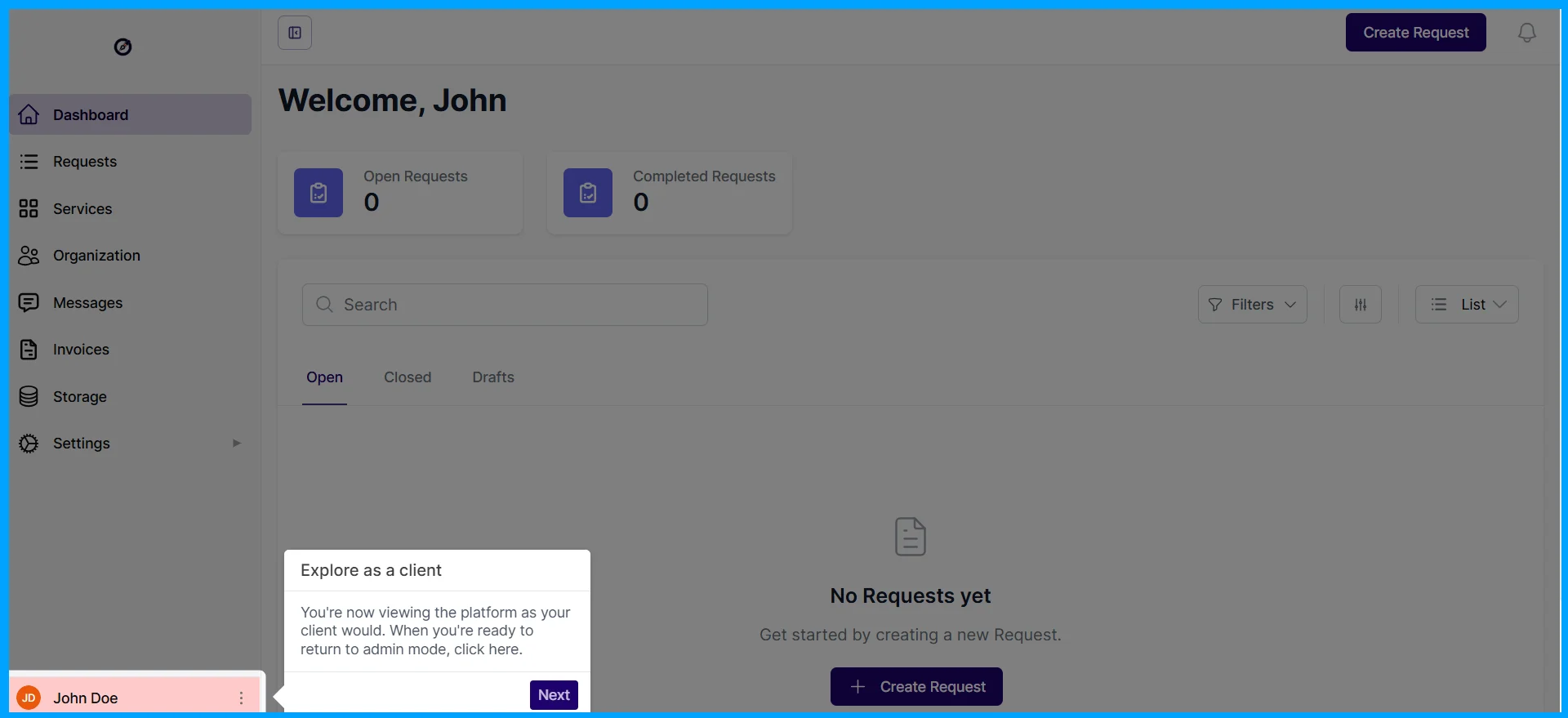
The client portal is the product's front door: clients log in to see their services, requests, files, messages, and invoices, under your logo, colors, and domain (for example, portal.youragency.com). You can add custom CSS, to further modify the UI/UX, on every plan, but sending emails from your own domain needs the Pro plan, and removing the "Powered by ManyRequests" badge needs Scale, the top plan.
Since October 19, 2026, the portal can also be installed as a branded app on iPhone and Android home screens, with push notifications on iPhone. That's one of the most recent upgrades I love: clients get an app-like experience without you building one. You can also decide whether search engines may index your portal, which matters if you use it as a public storefront rather than a private client area.
One detail I like: if your ManyRequests subscription lapses, your clients can still log in and view their existing requests, files, and messages. Nothing is deleted, and after you cancel, your data is kept for about 30 to 90 days.
Service catalog, checkout, and order forms
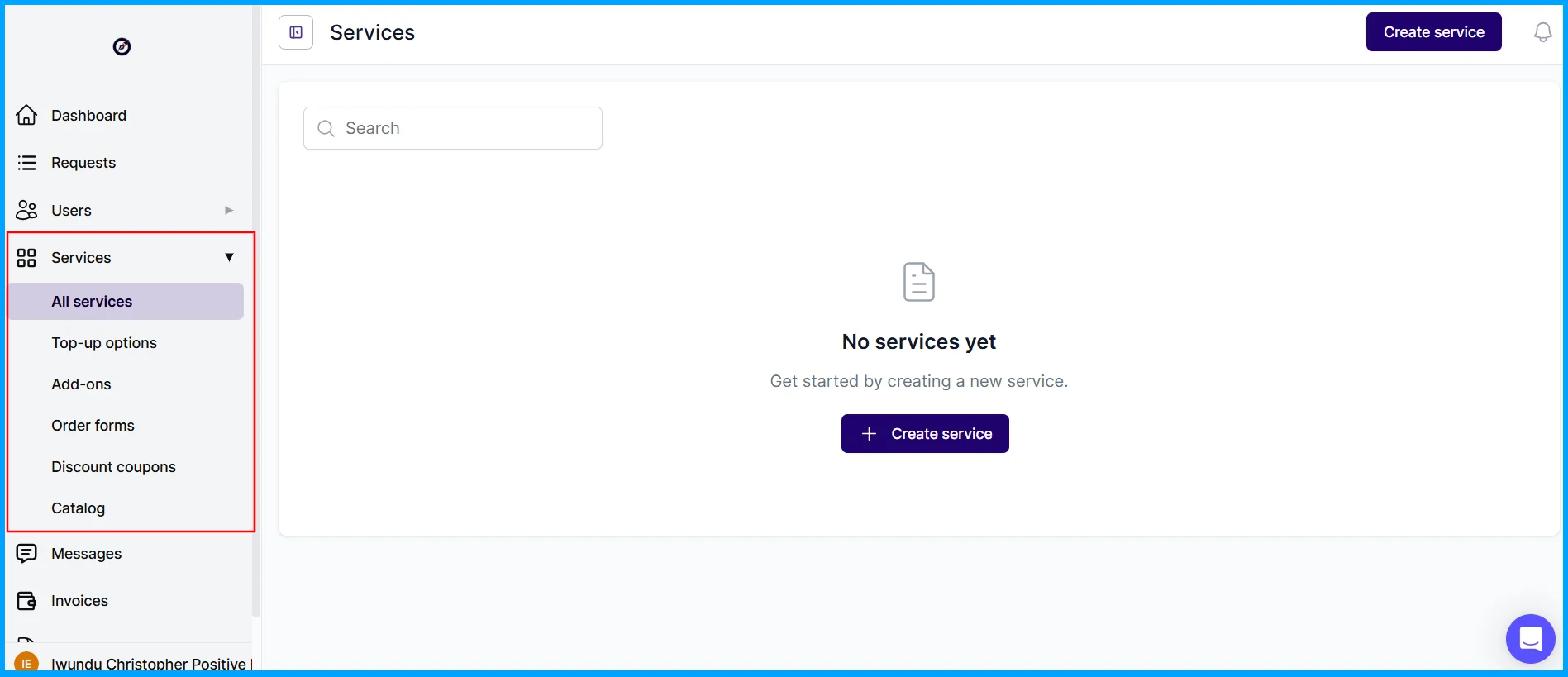
ManyRequests works like a small online store for your services. You create one-off, recurring, hour-based, or credit-based services, give each one a branded checkout page, and embed the order form or the whole catalog on your website. Clients pay, an account is created for them, and they land in your portal.
The checkout has grown into a proper sales tool over the past year:
- Setup fees on subscriptions to cover onboarding.
- Free or paid trials for your own services.
- Upsells, add-ons, top-ups, and discount codes, including coupons that apply automatically.
- Self-serve upgrades and downgrades where you choose which plans a client can switch to.
- Conditional logic in order forms, so clients only see the questions that apply to them.
- Headcount pricing and monthly and annual pricing on one service.
- Terms and conditions and conversion tracking on checkout pages.
This particular section is essential for productized agencies; it replaces a separate checkout tool and a pile of Stripe payment links.
Client requests, the queue, and the request limit
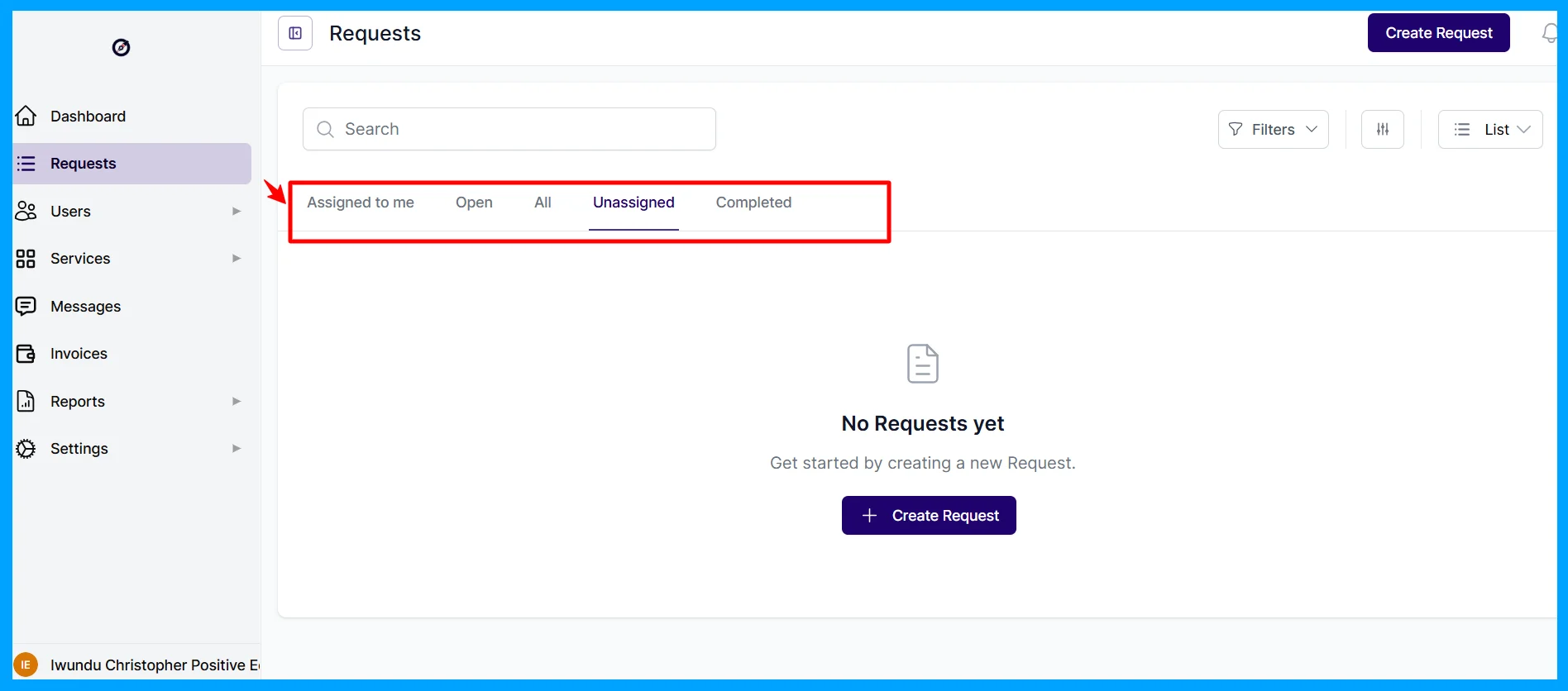
Requests are where the work happens. Clients submit requests through forms you design, and your team manages them in Kanban, list, calendar, or queue views, with custom statuses, priorities, due dates, subtasks, checklists, templates, internal comments, and canned responses. Requests can also arrive by email; each workspace has its own address, and a client's email becomes a request with its attachments.
One feature here that sets ManyRequests apart is the request limit. On each service, you can set a maximum number of concurrent requests per client and, for recurring services, a maximum number of requests per month. When a client hits the limit, new requests get a ‘Queued’ status, the client sees ‘You have reached the maximum number of active requests allowed for your plan,’ and the next request moves up automatically when one is completed. Clients can also reorder their own queue by priority.
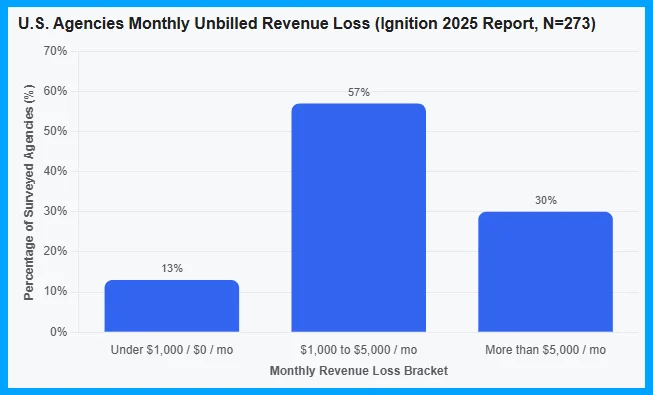
This matters more than it sounds. Scope creep is one of the biggest leaks in agency revenue: 57% of 273 surveyed managers and executives at US marketing, creative, and web agencies say they lose $1,000 to $5,000 a month to unbilled work, and another 30% say they lose more than $5,000, according to Ignition's 2025 Agency Pricing and Cash Flow Report (opens in a new tab). The same survey found that 78% of agencies rarely or only sometimes charge for out-of-scope work.
A request limit doesn't stop scope creep on its own, but it makes the boundary visible to the client, in the portal, every time. Combine it with add-ons and plan upgrades, and a ‘can you also do this?’ becomes an ‘upgrade to two active requests.’ That way, you get paid the right amount for your work.
Billing, subscriptions, credits, and invoicing
ManyRequests handles one-time and recurring invoices, subscriptions that clients can pause, cancel, renew, or upgrade themselves, retainers, hour and credit balances per client, invoices built from tracked time or from requests, taxes by country, state, or province, and prices in currencies such as USD, EUR, GBP, and AUD. Failed payments trigger automatic reminders, and since October 2026, clients can change the card on a subscription themselves. ManyRequests charges no fees on payments; you pay only Stripe's fees.
That's useful, because cash flow is the other big agency problem. In the same Ignition survey, 71% of agencies said at least one in four invoices is paid late, and 84% spend at least 3 to 10 or more hours a month chasing late payments. Charging subscriptions automatically, upfront, removes most of that chasing.
The only concern I have in this section is Stripe. Stripe is the only payment gateway ManyRequests integrates with for now. There's no PayPal integration; for PayPal, bank transfers, or Wise, you use manual payments, where the invoice stays pending until you mark it paid. That means no automatic subscription charges and no automatic reminders for failed card payments.
This matters if you run your agency from a country where Stripe isn't fully available. When I checked Stripe's global availability page (opens in a new tab), I saw that some countries (like Nigeria) have an ‘extended network’ label linked to their local payment provider (like Paystack) and some countries (like India) require you to contact sales. Before you commit, confirm you can open a Stripe account for your business. If you can't (and you’re in Africa or Asia), you can still invoice clients through ManyRequests and receive bank transfers into a foreign-currency account, such as a USD account from (opens in a new tab)Raenest (opens in a new tab), but you'll mark each invoice as paid by hand.
There's also no direct QuickBooks or Xero integration; you export invoices to CSV or connect your accounting tool through Zapier.
Time tracking, approvals, and Hubstaff
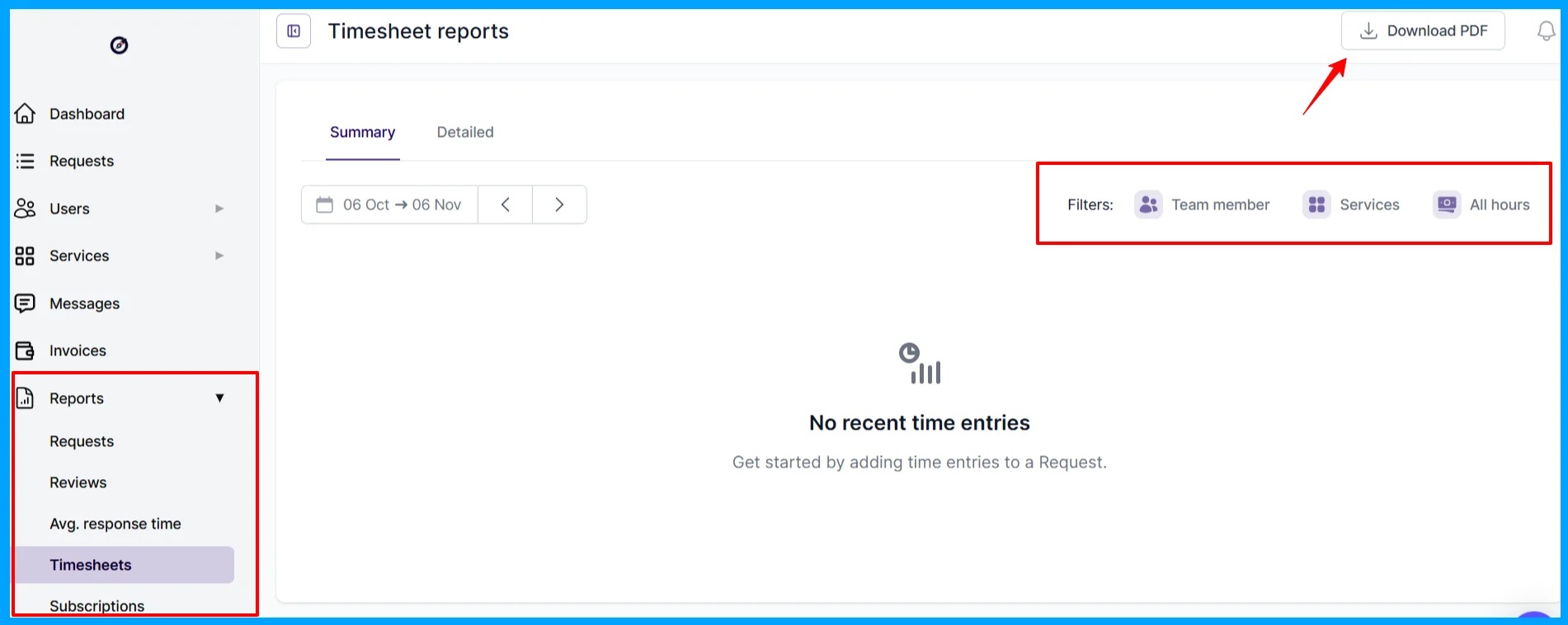
Built-in time tracking lets your team log time against requests, mark entries as billable or non-billable (billable time deducts from the client's hour balance), and turn time into invoices and timesheet reports. In October 2026, ManyRequests added time entry approvals, where entries stay pending until a manager approves them, and a Hubstaff integration that syncs time tracked in Hubstaff (opens in a new tab) automatically.
You can also filter and view by team members, specific services, and hours used within a range of days.
For agencies selling hour-based retainers, this solves a major problem other tools don’t address: the hours a client bought, the hours used, and the invoice all live in the same place the client can see.
File proofing and annotations
Clients can comment directly on images, PDFs, and GIFs, and leave timestamped comments on videos, with versioning so everyone knows which draft is current. Since October 2026, comments in the file viewer update live without a refresh. Files can be up to 10GB each.
For design and video agencies, proofing inside the portal means feedback stops arriving in five different places, making it easier to track.
CRM, client reviews, and tips
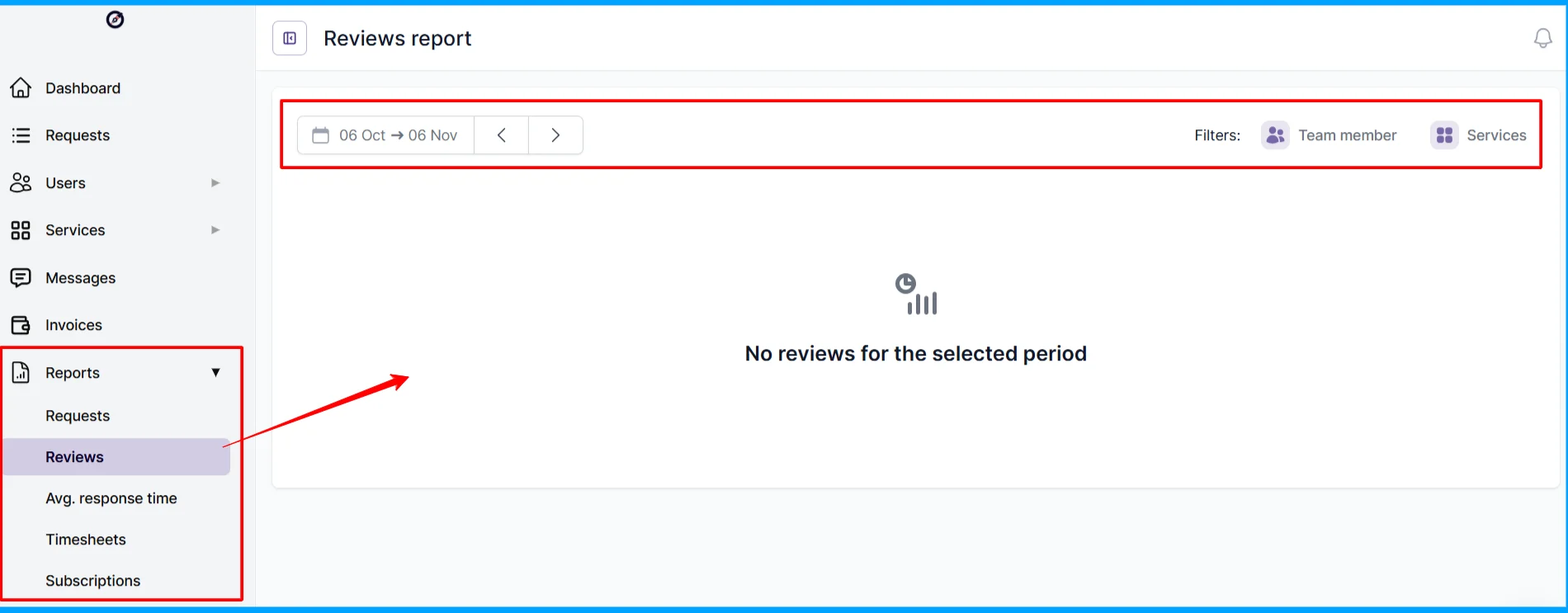
The CRM keeps client organizations, contacts, tags (such as VIP or Enterprise), and account managers in one place, and you can filter requests by organization tags and account managers. Clients can rate completed requests, and since October 30, 2026, they can tip your team after a 4- or 5-star review, with reminders to review requests they haven't rated. A Reviews report, protected by its own permission, shows how satisfied each client is.
Tips are a small feature, but they're a clever one for subscription businesses: they reward the team and give you a steady read on client happiness without a separate survey tool.
Reporting and workload management
Reports cover services and sales, subscriptions, timesheets, and reviews, with CSV exports. On Pro, the Workload view shows who's working on what and allows drag-and-drop reassignment, which ManyRequests rebuilt in October 2025 to replace their former ClickUp-style task tracking for creative teams. They also now show yellow and red warnings on Kanban cards for approaching and overdue due dates.
This is enough to run a delivery team of marketers, designers, or editors.
The entire platform doesn’t provide resource planning per se (at least for now): there are no Gantt charts, project budgets across phases, or capacity forecasting, so agencies running large, multi-month projects might find it lacking.
Integrations, API, and the MCP server
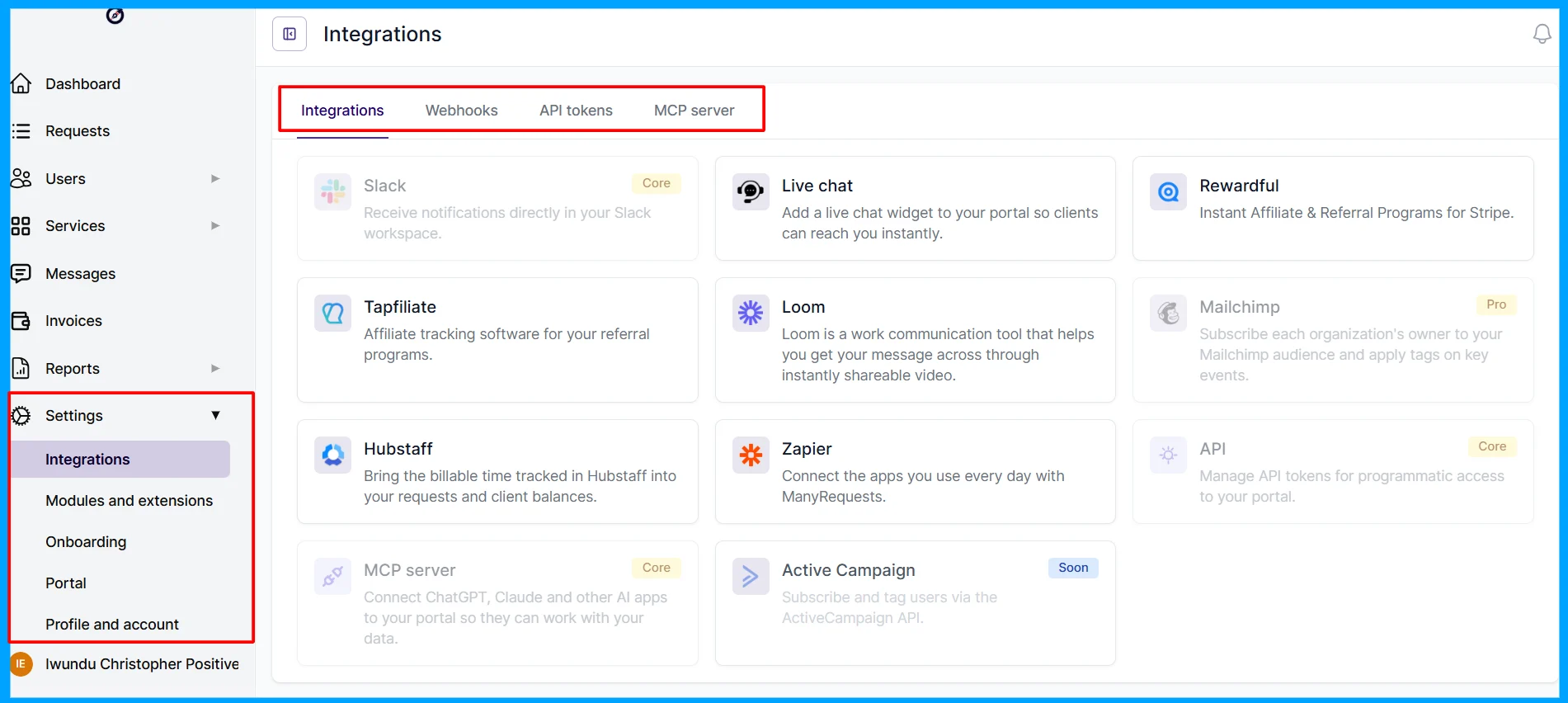
ManyRequests integrates with Zapier (with time-entry, request, comment, and search actions), Slack for your team and your clients, webhooks, Mailchimp, Rewardful and Tapfiliate for affiliate programs, Hubstaff, and Loom, and you can embed tools like Calendly and Airtable. Its first public API went live on April 27, 2026, with endpoints for services, requests, organizations, clients, and invoices.
The newest piece right now is the ManyRequests MCP server that went live in September 2026. Once connected to Claude, ChatGPT (paid plans), Cursor, VS Code, or Claude Code, an AI assistant can find, read, create, update, and comment on requests, look up clients and services, add subscriptions, and create, send, and mark invoices as paid, in plain language. Note, though, that it can't refund or delete invoices, cancel subscriptions, or upload files, which are sensible limits. Only portal admins can connect the MCP.
In practice, this ManyRequests MCP server solution means you can ask an AI assistant, ‘Which clients have requests overdue this week?’ or ‘Send client A's invoice and add a comment to their latest request,’ without opening the portal. Few client portals in this price range offer that today.
Security and data protection
ManyRequests runs on Amazon Web Services, encrypts data at rest with AES-256 and in transit with TLS 1.2, keeps point-in-time backups, and offers two-factor authentication. I checked the help center, and it says ManyRequests acts as a data processor under GDPR, with a Data Processing Agreement included in its terms and named subprocessors (AWS, Stripe, and Postmark), and that your data may be processed outside the EU under Standard Contractual Clauses. You can export or delete your portal data.
Something I found missing for larger clients: ManyRequests' security page doesn't mention SOC 2 certification, penetration testing, or single sign-on (SSO). If you sell to enterprises that send security questionnaires, I recommend you ask ManyRequests for documentation before you onboard them.
ManyRequests pricing: what each plan includes
ManyRequests sells three plans, Core, Pro, and Scale, with unlimited clients on every plan. Core includes 2 team seats and Pro includes 5, and you pay for each extra team member; Scale includes unlimited seats at one flat price. Large agency groups can also ask for a custom Enterprise contract, priced per seat.
Core | Pro | Scale | |
|---|---|---|---|
Price, billed monthly | $39/month | $99/month | $799/month |
Price, billed annually | $27/month ($324/year) | $69/month ($828/year) | $559/month ($6,708/year) |
Seats included | 2 | 5 | Unlimited |
Extra seat | $10/month ($8 billed annually) | $14/month ($12 billed annually) | Included |
Clients | Unlimited | Unlimited | Unlimited |
Client portal, requests, billing, time tracking, CRM, reporting, MCP server, mobile app (PWA) | Yes | Yes | Yes |
Custom domain and branding | Yes | Yes | Yes |
Remove "Powered by" badge | No | No | Yes |
Custom email domain and email templates | No | Yes | Yes |
Workload management, Slack, webhooks, and API | No | Yes | Yes |
Priority support and account manager | No | No | Yes |
Concierge onboarding | No | No | Yes |
Free trial | 14 days, no card | 14 days, no card | 14 days, no card |
What a team actually pays
Because Core and Pro include only a few seats, your team size can matter more than the plan price. So I worked out the maths for what ManyRequests costs for common team sizes, using the published seat prices:
Team size | Core, monthly | Core, annual | Pro, monthly | Pro, annual |
|---|---|---|---|---|
1 person | $39 | $27 | $99 | $69 |
3 people | $49 | $35 | $99 | $69 |
5 people | $69 | $51 | $99 | $69 |
10 people | $119 | $91 | $169 | $129 |
Your key takeaway is this: For a solo founder, ManyRequests is cheap. For a 10-person team on Pro, it's about $130 to $170 a month, which is still less than what many agencies spend on the separate tools it replaces. Scale ($559 a month billed annually, or $799 monthly) only saves money on seats past about 45 people on annual billing; below that, you'd pay for it to remove the "Powered by" badge and get a dedicated account manager.
What I'd want you to know before signing up
- ManyRequests' own pages disagree on some limits; something their marketing team needs to fix. The pricing page marks Slack, webhooks, and the API as Pro features, while the help center says Core includes the API, the MCP server, and Slack, and that webhooks work on every plan. If that’s a big difference maker for you, I recommend you reach out to them to confirm your seat count, storage, and integrations.
- You'll likely want Pro. Sending email from your own domain and the Workload view are Pro-only, and those are the features that make the portal feel fully yours. Removing the "Powered by ManyRequests" badge now takes Scale, the top plan.
- Billing depends on Stripe. Check that you can open a Stripe account before you build your services.
- Legacy plans exist. ManyRequests' help center mentions older Basic, Plus, Ultimate, and lifetime plans, so reviews and tutorials you find online may describe features or limits that no longer match the current plans.
ManyRequests pros and cons
ManyRequests: pros and cons
Pros
- Pro: Request limits and a client-ordered queue turn scope control into a built-in, visible rule
- Pro: Selling, requests, proofing, time tracking, and billing in one branded portal with unlimited clients
- Pro: No fees on payments; you pay only Stripe's fees
- Pro: Flexible service billing: subscriptions, credits, hour balances, setup fees, add-ons, top-ups, and trials
- Pro: Public API and an MCP server for running the portal from Claude or ChatGPT
- Pro: Ships often: 82 product updates between November 2025 and October 2026
- Pro: Clients keep access to their files and requests even if your subscription lapses
Cons
- Con: Stripe is the only integrated payment gateway; no PayPal, and manual payments lose automation
- Con: Extra seats add up past the 2 included on Core or 5 on Pro, and Scale jumps to $559 a month
- Con: Custom email domain and workload management need Pro, and removing the "Powered by" badge needs Scale
- Con: No Gantt charts, project budgets, or capacity planning for complex projects
- Con: No native QuickBooks or Xero integration
What's new on ManyRequests?
ManyRequests published 82 updates to its public changelog between November 2025 and October 2026, most of them about billing, subscriptions, and requests. There were no entries in May or June 2026; updates resumed with a performance release on July 2, 2026. Here are the most important ones:
| Launch or change |
|---|---|
October 2025 | Workload view rebuilt; real-time in-app notifications |
November 2025 | Scheduled responses; delete-request permissions |
January 2026 | Editable client email templates (Pro); scheduled subscription upgrades and downgrades |
February 2026 | Taxes by state or province; mixed subscription and custom line items on invoices; fairer upgrades for hour-based plans |
March 11, 2026 | Self-serve plan upgrades and downgrades; setup fees for subscriptions; skip the request form for one-off purchases |
April 7, 2026 | Requests by email; clients set due dates on submission; lock comments on completed requests; control Google indexing of your portal |
July 2026 | Mailchimp and Tapfiliate integrations; billable and non-billable time; faster performance |
August 18, 2026 | Create invoices via API; invoice CSV export; restore deleted requests; up to 250 requests per page |
September 1, 2026 | ManyRequests MCP server |
October 2026 | Time entry approvals; Hubstaff integration; invoice discounts; installable branded app with iPhone push notifications; client tips after reviews |
Is ManyRequests worth it?
ManyRequests is worth it if you sell productized or subscription services and you're currently stitching together a checkout, a task board, file sharing, a time tracker, and invoices. One portal at $69 to $99 a month on Pro, for a solo founder or a team of up to five, usually costs less than that stack, and the request limits alone can pay for it if they stop a few hours of unbilled work each month.
It's a market worth building for: 28% of the US agencies in Ignition's survey said they price with productized, subscription, or tiered bundles, the same share as hourly pricing. Those agencies are exactly who ManyRequests is designed around.
It might not be worth it if you run custom, multi-month projects that need project budgets and resource planning, if your clients pay mainly through PayPal or bank transfer. If your enterprise clients will require SSO, I recommend you have a conversation with the ManyRequests team before onboarding.
Is ManyRequests safe and legit?
Yes. ManyRequests is a registered company (ManyRequests LLC) founded in 2019, backed by Calm Company Fund, and used by more than 1,800 agencies. Payments go directly to your own Stripe account rather than through ManyRequests. It encrypts data at rest and in transit, offers two-factor authentication, and publishes a Data Processing Agreement and its subprocessors for GDPR. The gaps are formal certifications: They don’t publicly list SOC 2 or SSO, but the Scale plan says to reach out to them if you need SSO.
What real users say about ManyRequests
User opinion of ManyRequests is positive, but there isn't much of it: the big review sites have only a handful of reviews.
Platform | Rating | Notes |
|---|---|---|
G2 | 4.5/5 | 1 review (August 2024), from a small-business CEO. |
Capterra | 5.0/5 | 7 reviews; ease of use and value for money were standout themes |
What people praise:
- A clean, modern portal that is a genuine edge over older, clunkier client portals.
- Consolidation. Reviewers value having requests and billing in one place instead of several tools. One testimonial called it "the entire backbone of our video editing agency."
- A good fit for productized agencies. One Capterra reviewer said it has "honestly been a really good fit for our agency," and another said the portal made a big difference because clients always know where to submit requests, review work, and leave feedback.
What people complain about:
- Seat-based costs. Per-seat add-ons make team pricing climb quickly beyond the base plan.
- Top-plan branding. Removing the ‘Powered by’ badge requires Scale, the top plan.
- Depth. The feature depth sometimes trails some dedicated billing or PM tools.
My honest takeaway
My honest takeaway here is that the complaints are about the seat-based costs as you grow and depth compared with specialist tools, not about whether ManyRequests works. Here is what I'd do before committing: run the 14-day free trial with one real client and one real service. Set a request limit, push the client past it, send an invoice, and see whether the queue and checkout feel right to them. Then price your actual team size with the table above, and confirm your seat count, storage, and Stripe setup. Another good news for intending users is that ManyRequests listened to customer feedback and reduced the pricing with an increased number of seats per plan.
ManyRequests vs. the alternatives
ManyRequests' closest rivals are other client portals for service businesses, and the right choice depends on how you sell, how big your team is, and how your clients pay.
If you | Consider | Starting price (checked November 1, 2026) |
|---|---|---|
Sell productized or subscription services and want request limits, a queue, time tracking, and billing in one portal | ManyRequests | $27/month billed annually (Core, 2 seats) |
Need PayPal as well as Stripe, or want 5 team seats included from the first plan | Wayfront (formerly SPP / Service Provider Pro) | $129/month (Base, 5 seats); a lower price is shown for yearly billing |
Want a branded client portal with a free plan and an app store of add-ons | Assembly (formerly Copilot) | Free plan (1 user, 5 clients); Starter $49/month, or $29/month billed annually |
Are you a freelancer or a small studio that wants proposals, projects, and invoicing in one tool | Plutio | $19/month (Core, solo); Pro $49/month with 30 contributors |
Mainly want shareable client project pages on a tight budget | SuperOkay | Free plan; Solo+ (3 team members, white label) $38/month |
Who should use ManyRequests?
Verdict: ManyRequests
Recommended with caveatsManyRequests is one of the most complete client portals for productized and subscription agencies: it sells your services, enforces request limits with a client-ordered queue, handles proofing and time tracking, bills through your own Stripe account with no extra fees, and now adds a public API and an MCP server. It gets expensive per seat as your team grows, it depends on Stripe for automated billing, and it's too light for complex project management.
- Best for
- Design, video, web, and content agencies of 1 to 15 people that sell fixed services or monthly subscriptions and want one branded portal for selling, delivery, and billing.
- Avoid if
- You run custom multi-month projects, your clients pay mainly through PayPal or bank transfer, you can't open a Stripe account, or enterprise clients require SOC 2 and SSO
Choose ManyRequests if you sell a menu of services or monthly subscriptions, you're tired of scope creep and chasing payments, and you want clients to buy, request, review, and pay in one place with your brand on it.
Choose something else if your work is custom and project-based (look at a full project management tool), your clients pay by PayPal (Wayfront supports it), or you're a solo freelancer who mainly needs proposals and invoices (Plutio is cheaper).
My suggestion for getting started: start the free trial and build just one service, with a checkout page, a request form, and a limit of one or two active requests. Invite one friendly client, let them submit three requests, and watch what happens when the queue kicks in. If they get it without a call from you, ManyRequests will work for your agency.
Frequently asked questions about ManyRequests
What is ManyRequests used for?
ManyRequests is used by agencies and productized service businesses to sell services, take client requests, deliver and proof work, track time, and bill clients in one white-label client portal. It's most popular with design, video, web, and content agencies that sell subscriptions.
How much does ManyRequests cost?
ManyRequests Core costs $39 a month with 2 team seats and Pro $99 a month with 5 seats, or $27 and $69 a month billed annually. Extra seats cost $8 to $14 a month each, and Scale, with unlimited seats, costs $799 a month, or $559 a month billed annually. Every plan includes unlimited clients.
Does ManyRequests have a free trial?
Yes. ManyRequests offers a 14-day free trial with no credit card required. If the trial ends without a paid plan, nothing is deleted, and your clients can still view their existing requests and files.
Does ManyRequests charge transaction fees?
No. ManyRequests doesn't charge any fees on payments. Clients pay into your own Stripe account, and you pay only Stripe's processing fees. Manual payments, such as bank transfers, carry no ManyRequests fees either.
Does ManyRequests support PayPal?
No. Stripe is the only payment gateway ManyRequests integrates with. You can accept PayPal or bank transfers as manual payments by adding your details to the invoice instructions, but you mark those invoices as paid yourself.
Can I limit how many requests a client submits in ManyRequests?
Yes. For each service, you can set a maximum number of concurrent requests per client and, for recurring services, a maximum number of requests per month. Requests over the limit are queued and move up automatically when earlier ones are completed.
Is ManyRequests white label?
Yes. Every plan lets you use your logo, colors, custom CSS, and your own domain. Sending emails from your own domain requires the Pro plan, and removing the "Powered by ManyRequests" badge requires Scale.
Does ManyRequests have an API?
Yes. ManyRequests launched its public API on April 27, 2026, covering services, requests, organizations, clients, and invoices. It also has an MCP server, launched in September 2026, that connects the portal to AI assistants such as Claude and ChatGPT.
What are the best ManyRequests alternatives?
Wayfront (formerly SPP) is the closest alternative for productized agencies and supports PayPal as well as Stripe. Assembly (formerly Copilot) offers a free plan and broader portal customization, Plutio suits freelancers who need proposals and invoicing, and SuperOkay is a budget option for client project pages.
Sources
- ManyRequests: Pricing (opens in a new tab)
- ManyRequests: Homepage (opens in a new tab) and About us (opens in a new tab)
- ManyRequests: Billing (opens in a new tab) and Projects (opens in a new tab)
- ManyRequests: Security (opens in a new tab)
- ManyRequests: Changelog (opens in a new tab)
- ManyRequests Help Center: How to manage the max number of active requests (opens in a new tab)
- ManyRequests Help Center: Which payment gateway do you support? (opens in a new tab)
- ManyRequests Help Center: What are your payment processing fees? (opens in a new tab)
- ManyRequests Help Center: Which features are included in each ManyRequests plan (opens in a new tab)
- ManyRequests Help Center: What happens when your trial ends or subscription lapses (opens in a new tab)
- ManyRequests Help Center: How to use the ManyRequests MCP server (opens in a new tab)
- ManyRequests Help Center: GDPR (opens in a new tab)
- ManyRequests Help Center: Affiliate program overview (opens in a new tab)
- ManyRequests: ManyRequests vs Assembly (opens in a new tab)
- Ignition: 2025 Agency Pricing and Cash Flow Report (opens in a new tab) and press release (opens in a new tab)
- Stripe: Global availability (opens in a new tab)
- G2: ManyRequests reviews (opens in a new tab)
- Capterra: ManyRequests (opens in a new tab)
- Wayfront: Pricing (opens in a new tab), Assembly: Pricing (opens in a new tab), Plutio: Pricing (opens in a new tab), and SuperOkay: Pricing (opens in a new tab).